 how-to
Is a Smart Thermostat Worth It for Energy Savings?
Table of Contents
- The Real Answer: When a Smart Thermostat Pays Off
- How Smart Thermostats Cut Heating and Cooling Costs
- Smart Thermostat vs Programmable Thermostat: What's the Difference?
- Best Thermostat Settings for Energy Savings
- Smart Thermostat Compatibility with HVAC Systems
- Calculating Your Smart Thermostat Payback Period
- Privacy, Data, and Cybersecurity: What to Know Before You Buy
- Conclusion
- Frequently Asked Questions
Last Updated: October 21, 2026
The Real Answer: When a Smart Thermostat Pays Off
A smart thermostat is worth it for energy savings when your household runs on a predictable schedule, your HVAC system is compatible, and you will actually use the scheduling tools. This guide from Times Square Remodeling Inc. breaks down the real math, the installation traps, and the settings that matter.
Here is the core tension most buyers miss. A smart thermostat does not create savings on its own. It saves money by cutting hours of unnecessary heating and cooling. If your current habits already avoid those hours, the device has little to trim.
The U.S.
Below, we walk through how these devices work, the settings worth using, and a simple way to estimate your own payback before you buy.
How Smart Thermostats Cut Heating and Cooling Costs
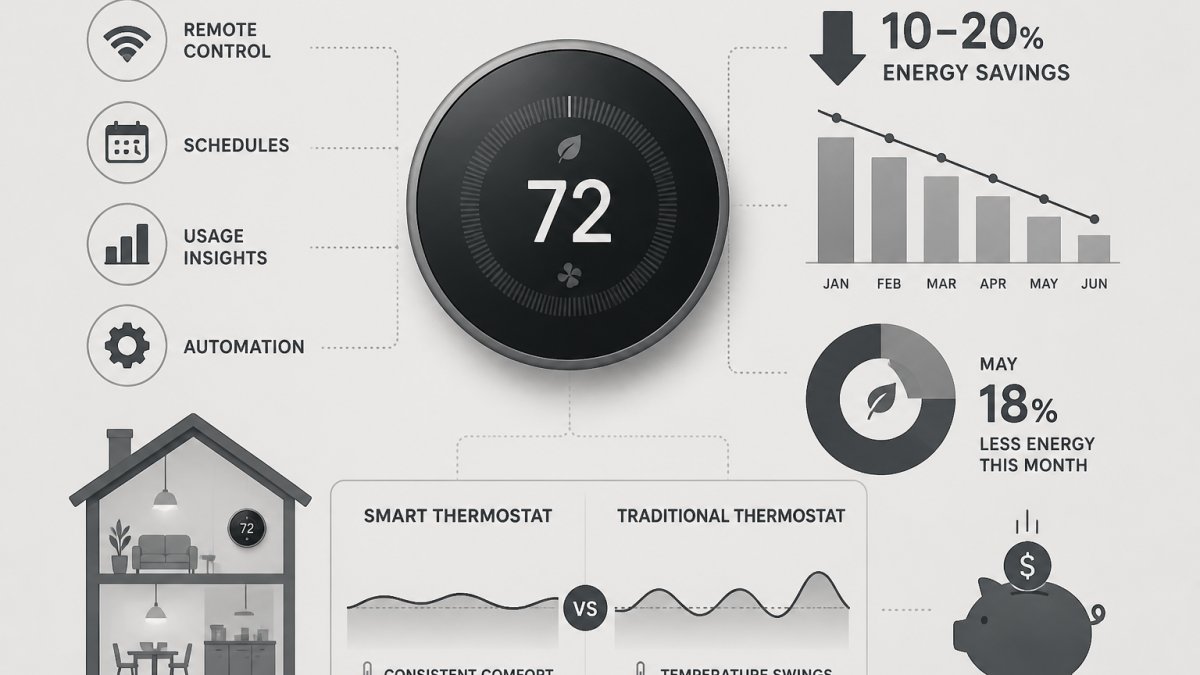
A smart thermostat is a connected device that learns your schedule and adjusts heating and cooling automatically to reduce wasted energy. It combines occupancy sensing, scheduling, and a mobile app so the system runs less when nobody needs conditioned air.
The savings come from three behaviors:
- Automatic setbacks during work hours and overnight sleep
- Occupancy detection that drops to away mode when the house empties
- Remote control so you stop heating an empty house on a whim
Automatic Scheduling and Learning Routines
Learning thermostats watch when you adjust the temperature and build a schedule around it. After the first week or two, they start pre-heating or pre-cooling before you arrive home.
This is where convenience meets savings. A traditional programmable thermostat only saves if you program it and never override it. Most people override it.
Occupancy Detection and Away Mode
Occupancy sensors use motion or phone location to detect an empty house. When everyone leaves, the thermostat switches to away mode and lets the temperature drift.
The catch: pets, guests, or a home office can confuse the sensors. Set a minimum and maximum so the house never gets too cold or hot for comfort or pipe safety.
Smart Thermostat vs Programmable Thermostat: What's the Difference?
The difference is automation. A programmable thermostat follows a fixed schedule you enter by hand. A smart thermostat adjusts that schedule on its own using occupancy, weather, and learned habits.
| Feature | Programmable Thermostat | Smart Thermostat |
|---|---|---|
| Scheduling | Manual entry | Automatic and learning |
| Occupancy sensing | None | Built in on most models |
| Remote control | Rare | Standard via app |
| Setup effort | Higher, all manual | Lower after first week |
| Best for | Fixed routines | Variable schedules |
The honest take: if your week is identical every single day and you already program your thermostat correctly, a smart model adds convenience more than savings. If your schedule shifts, the automation earns its keep.
Best Thermostat Settings for Energy Savings
The best settings pair a modest setback with a consistent schedule. Set occupied temperatures to your comfort level, then push a few degrees toward savings during away and sleep hours.
Setback Temperatures by Season
Use these starting points, then adjust to your comfort:
- Heating season, awake: 68°F
- Heating season, away or asleep: 60°F to 62°F
- Cooling season, awake: 76°F to 78°F
The Department of Energy recommends these general ranges as a starting point for most homes (EXTERNAL_LINK: Energy Saver thermostat guidance | energy.gov). Keep the gap moderate. A huge swing can trigger a long, expensive recovery run when you return.
Smart Thermostat Compatibility with HVAC Systems
Compatibility is the most common reason a smart thermostat install goes sideways. Most models work with standard forced-air systems, but heat pumps, multi-stage equipment, and older wiring need a closer look. The checklist below is the one to run before you buy, so you do not end up with a device that will not control your system.
Pre-Purchase Compatibility Checklist
Work through these items in order. Each one can rule a model in or out.
- Identify your system type. Forced-air furnace and AC, heat pump, radiant, or zoned system. Heat pumps and zoned systems are the two that most often need a specific model.
- Count your wires. Turn off power at the breaker, remove the old thermostat, and photograph the wiring before you disconnect anything. Note the letters on the terminals and the colors of the wires.
- Check for a C-wire. The C-wire (common wire) powers the thermostat continuously. Many smart models need one. If you do not have a C-wire, you may need an adapter, a new wire run, or a model that works without one.
- Note auxiliary and emergency heat. Heat pump systems often have auxiliary (AUX) and emergency (E) heat wires. Confirm the model supports them, because some smart thermostats do not.
- Check stages. Multi-stage furnaces and ACs, and variable-speed equipment, need a thermostat that supports the same number of stages. A single-stage thermostat on a two-stage system wastes the second stage.
- Confirm the model's compatibility checker. Every major manufacturer publishes a compatibility checker on its site. Enter your wire letters and system type and it will tell you whether the model works.
Wiring, C-Wire, and Heat Pump Considerations
The C-wire is a common wire that powers the thermostat continuously. Many smart models need one. Homes without a C-wire may need an adapter or a new wire run, and that is the most common reason a DIY install stalls.
Heat pumps add complexity. Some smart thermostats support auxiliary and emergency heat, and some do not. A thermostat that does not support AUX heat can leave you without backup heat on a cold night, which is a comfort and safety issue, not just a convenience one.
When to Call a Professional
A qualified installer can confirm wiring, C-wire needs, and heat pump support in a single visit. That check prevents a return and a second trip. Call a pro if any of these apply:
- You have a heat pump with auxiliary or emergency heat.
- You have a zoned system with multiple thermostats.
- You cannot find a C-wire and do not want to run new wire.
A compatibility check takes about 15 minutes and saves the cost and hassle of a return. Do it before you buy, not after.
Calculating Your Smart Thermostat Payback Period
The payback period is the time it takes for energy savings to equal what you spent on the device and installation.
Here is the method:
- Add your total upfront cost. Device price plus any installation or wiring work. If you plan to hire a pro, ask for a quote that separates the device from the labor so you can see the true installed cost.
- Estimate annual heating and cooling spend. Pull your last 12 months of utility bills and add up the heating and cooling portions. If you have a gas furnace and electric AC, separate the two so you do not overstate the savings on one fuel.
- Estimate the share of hours you will actually set back. Count the hours per day the house is empty or everyone is asleep, then discount that share for the days you override the schedule. A common pattern is to assume you capture 60% to 80% of the theoretical setback hours, because real households override more than they expect.
- Divide cost by annual savings. The result is your payback in years. Apply any rebates or utility incentives to the upfront cost before dividing, since they shorten payback directly.
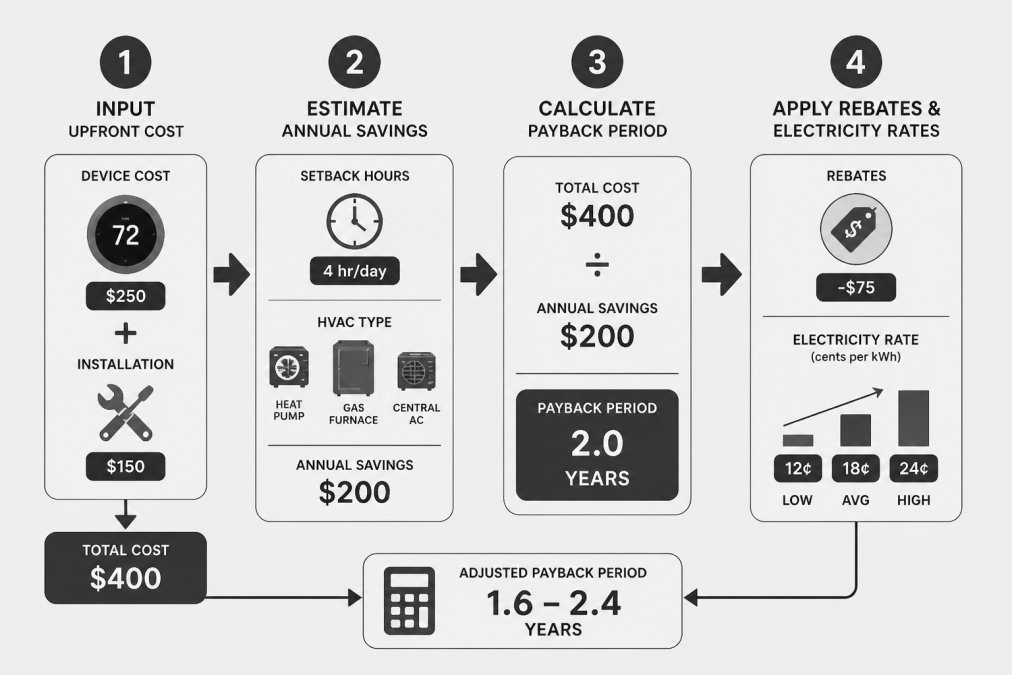
Worked example with realistic ranges:
- Upfront cost: a smart thermostat typically runs from about $100 to $300 for the device, and professional installation commonly adds $100 to $300 depending on wiring work, so a realistic installed range is roughly $200 to $600.
- Annual HVAC spend: use your actual bills. A household that spends $1,200 a year on heating and cooling is a useful starting point for the math.
- Setback share: if the house is empty or asleep 10 hours a day, that is about 42% of the day; discounting for overrides, assume you capture 30% of annual HVAC spend as the savings base.
That range, roughly one to three years for a household with a predictable schedule, is the honest answer for most buyers.
Rebates and Utility Incentives
Many utilities and state energy programs offer rebates for smart thermostats, and some demand-response programs pay you for letting the utility adjust your thermostat during peak events. Check your utility's website and your state energy office before you buy, because a rebate can cut the upfront cost by a meaningful fraction and shorten payback. Read the program terms: some rebates require professional installation or a specific model, and demand-response participation may override your settings on peak days.
Why the Payback Varies So Much by Household
The same device can pay back in one year in one home and never in another. The biggest drivers are:
- Schedule predictability. A household with consistent away hours captures more setback time than one with someone home all day.
- HVAC type. Heat pumps, multi-stage systems, and systems with auxiliary heat behave differently under setbacks, and some recover more efficiently than others.
- Electricity rate structure. Time-of-use rates and demand charges can make peak-hour setbacks more valuable, while flat rates make them less so.
For current pricing on energy-efficient upgrades, check with our team at Times Square Remodeling Inc. for a project-specific quote.
Privacy, Data, and Cybersecurity: What to Know Before You Buy
A connected thermostat collects data: occupancy patterns, temperature history, and sometimes location. That data can be useful, but it deserves a look before you buy.
Ask three questions:
- What data does the device collect, and can you opt out?
- Does the app require two-factor authentication?
- How long does the company keep your history?
The Federal Trade Commission publishes guidance on protecting your home devices and accounts (EXTERNAL_LINK: FTC guidance on smart home security | ftc.gov). Use a strong password, enable two-factor login, and keep firmware updated.
Conclusion
The honest answer is that a smart thermostat pays off when your schedule creates real hours of wasted heating and cooling.
At Times Square Remodeling Inc., we handle energy-efficient upgrades end to end, from compatibility checks to installation, backed by 15+ years of experience and a California contractor license (#953868).
Get started with Times Square Remodeling Inc. and turn your thermostat upgrade into measurable comfort and savings.
Frequently Asked Questions
How much energy can a smart thermostat save?
Savings vary widely by home, climate, and habits. The U.S. Department of Energy estimates that properly setting back a thermostat 7-10 degrees for 8 hours a day can save up to 10% annually on heating and cooling. Smart thermostats make those setbacks automatic, so you capture savings without remembering to adjust. Homes with erratic schedules or frequent away periods tend to see the largest gains, while homes occupied all day may see less.
Do smart thermostats work with every HVAC system?
No. Most smart thermostats work with standard forced-air systems, but compatibility varies. Heat pumps, multi-stage systems, and systems with proprietary wiring may require specific models or a C-wire. Check the manufacturer's compatibility checker using your current thermostat's wiring labels before buying. If you have a heat pump, confirm the thermostat supports auxiliary and emergency heat. A licensed HVAC technician can verify compatibility and install a C-wire if needed.
How long does it take for a smart thermostat to pay for itself?
Payback depends on your upfront cost, local utility rates, and how much you actually save. Homes with high energy use or frequent away periods often see faster payback. Use a simple calculator: divide total installed cost by estimated annual savings to get your payback period in years.
What is the difference between a smart thermostat and a programmable thermostat?
A programmable thermostat follows a fixed schedule you set manually. A smart thermostat adds learning, occupancy detection, remote control via mobile app, and automatic adjustments based on your daily routine. The key difference is convenience and adaptability: programmable models save energy only if you program them correctly and consistently, while smart models adjust for you. For households with irregular schedules, the smart thermostat vs programmable thermostat gap in real savings can be significant.